
Team and roles
Team and roles
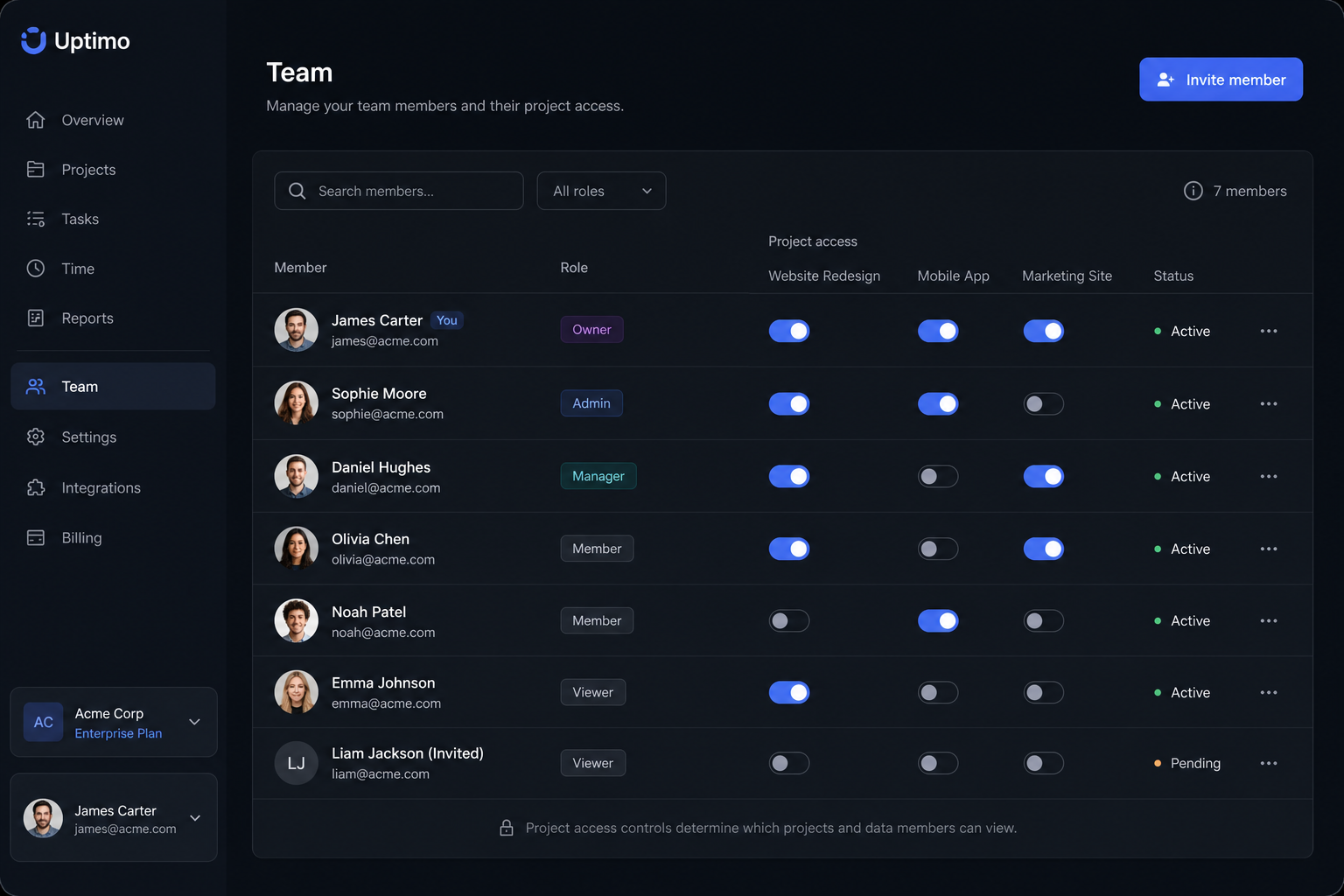
Invite colleagues, scope access by project and area — one workspace for sales, finance, and support without “everyone sees everything”.
Why roles beat a shared password
Shared credentials blur accountability and increase leak risk. In Uptimo everyone signs in individually with project-scoped limits.
That lowers human error and simplifies audits: you can see who changed a client card or deal status.
How collaboration is structured
Owners or admins invite members, assign roles and projects. Sales, finance, and support can coexist without crossing confidential areas.
Compared with shared accounts, this reduces accidental edits and data exposure.
Scaling headcount
As you grow, “project = access boundary” scales more cleanly than fixing permissions across dozens of sheets.
Plans with user and project limits — see Pricing.
Before and after: access without chaos
| Before | After with Uptimo |
|---|---|
| One shared login or passwords passed in chat | Individual accounts and roles |
| Unclear who could see finance vs CRM | Scoped access by projects and sections |
| New hires get full access “to save setup time” | Invites only to the projects and areas they need |
| Figuring out “who changed what” outside the app | Activity context on CRM records where the product supports it |
Typical outcomes for security and scale
- Clear trail of who could access sensitive data when incidents are reviewed.
- New hires join the right projects without sharing one password for the whole tenant.
- Fewer mistakes: people do not see sections outside their role.
Role design and policies remain your responsibility; the platform provides segregation tooling.
Frequently asked questions
Pricing
Free
Для старта — базовая CRM/ERP и операционный контроль без оплаты
- 1 место (владелец аккаунта)
- 1 проект для старта
- 1 канбан-доска
- Базовая CRM-воронка и задачи
- Финансовый журнал вручную
- До 2 проверок сервисов
- История проверок 7 дней
- 1 страница статуса
- Без приглашения в команду
- Без виджетов Live Chat
- Без серверного агента
Business
Для растущих команд — CRM, проекты, чаты и расширенный мониторинг
- Всё из Free, и ещё:
- До 4 мест в команде
- До 10 проектов
- До 5 канбан-досок
- До 2 виджетов Live Chat на сайт
- Расширенная CRM и командная работа
- Финансы по проектам и категориям
- До 30 проверок, SSL и домены
- 3 страницы статуса
- Серверный агент для 1 сервера
- Доп. место — 490 ₽/мес
Company
Для компаний — больше лимитов, команды и White Label
- Всё из Business, и ещё:
- До 16 мест в команде
- До 50 проектов
- До 20 канбан-досок
- До 10 виджетов Live Chat на сайт
- До 200 проверок сервисов
- 20 страниц статуса и White Label
- История и инциденты 180 дней
- Мониторинг до 10 серверов
- Доп. место — 490 ₽/мес
Команды собирают продажи, проекты и финансы в Uptimo
Вместо отдельных таблиц, чатов и сервисов — единый рабочий кабинет, где видно клиентов, задачи, деньги и поддержку.
Раньше сделки были в таблице, задачи в мессенджере, финансы отдельно. В Uptimo видим весь путь клиента: заявка, договорённости, работа и оплата.
Менеджеры ведут воронку, продакшен забирает задачи на канбан, а руководитель смотрит сводку без ежедневных созвонов “у кого что зависло”.
Подключили чат и почту: обращения перестали теряться. Новые письма сразу становятся диалогами, а команда видит, кто должен ответить клиенту.
Раньше сделки были в таблице, задачи в мессенджере, финансы отдельно. В Uptimo видим весь путь клиента: заявка, договорённости, работа и оплата.
Менеджеры ведут воронку, продакшен забирает задачи на канбан, а руководитель смотрит сводку без ежедневных созвонов “у кого что зависло”.
Подключили чат и почту: обращения перестали теряться. Новые письма сразу становятся диалогами, а команда видит, кто должен ответить клиенту.
Финансовый журнал удобно привязывать к проектам. Стало проще понимать, какие работы прибыльные, а где деньги расходятся по мелочам.
Операционный мониторинг оставили в Uptimo: если падает сайт или API, это видно рядом с клиентскими процессами, а не в отдельном техническом сервисе.
Для небольшой команды важно, что CRM, задачи, чаты и база знаний в одном интерфейсе. Новых сотрудников вводим быстрее, без пачки разных инструментов.
Финансовый журнал удобно привязывать к проектам. Стало проще понимать, какие работы прибыльные, а где деньги расходятся по мелочам.
Операционный мониторинг оставили в Uptimo: если падает сайт или API, это видно рядом с клиентскими процессами, а не в отдельном техническом сервисе.
Для небольшой команды важно, что CRM, задачи, чаты и база знаний в одном интерфейсе. Новых сотрудников вводим быстрее, без пачки разных инструментов.
Запустите CRM/ERP за пару минут
Без контрактов и привязки карты. Создайте проекты, добавьте сделки, задачи и команду — так вы быстро оцените единый контур управления бизнесом.