
Integrations and API
Integrations and API
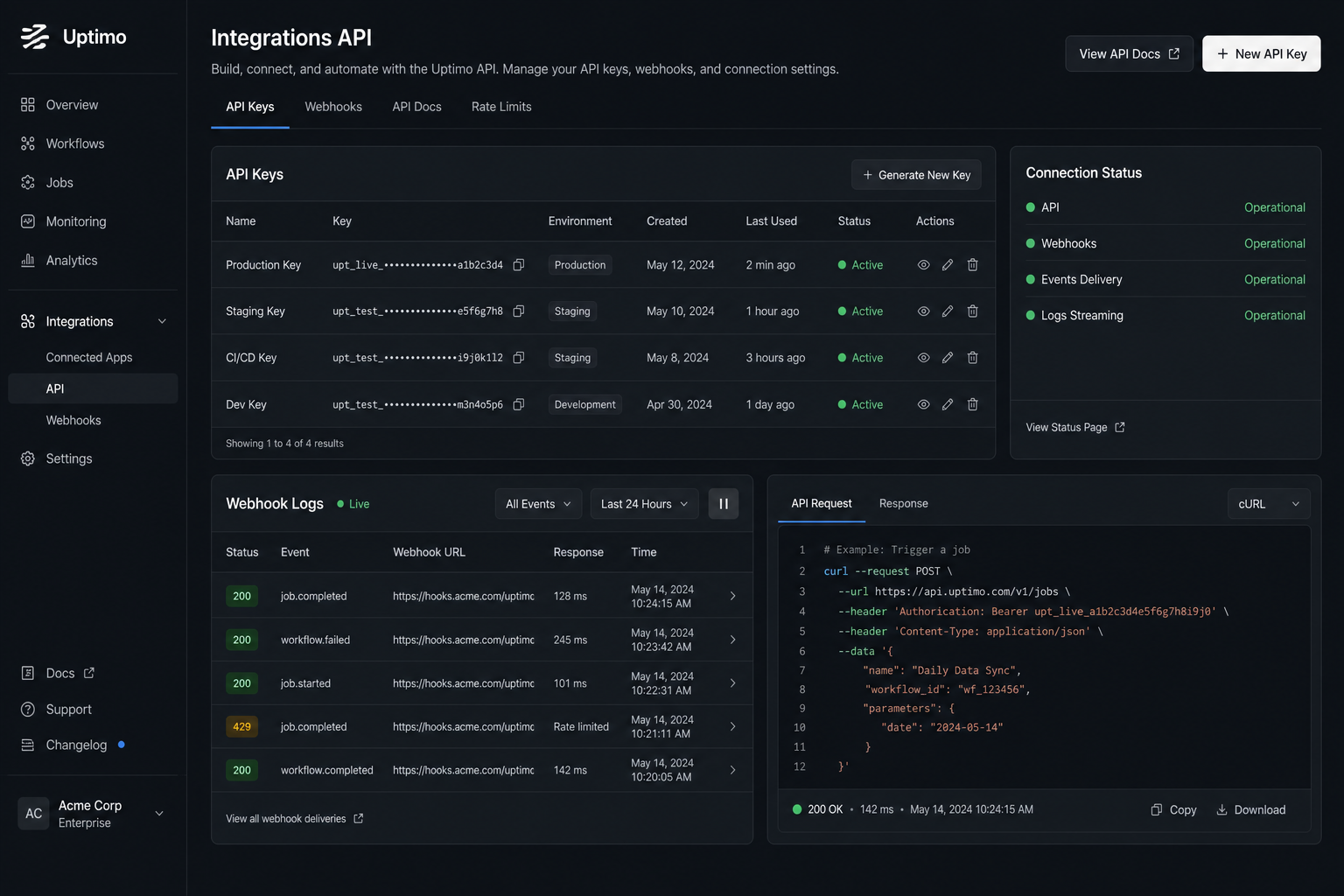
User API, webhook logs, and connecting Uptimo to your stack: website, billing, internal services — without vendor lock-in to a single closed CRM.
Why API matters for a mature CRM
Growing companies add channels: website, telephony, warehouse. A CRM without APIs becomes a dead end.
Uptimo is built for connectivity — your developers or partners can implement scenarios around events and data.
Security and control
Use separate keys, IP restrictions where possible, and least privilege. Logs help you debug integrations safely.
That lowers compromise risk when employees or contractors rotate.
Where to start
Describe the event (deal, payment, task), receive webhooks on a test endpoint, enable logging, then move to production.
Alongside integrations, CRM automations and HTTP/SSL monitoring help keep your endpoints reachable.
Before and after: connectivity without copy-paste
| Before | After with Uptimo |
|---|---|
| Data moved manually between CRM and your site or internal tools | Exchange via API and events on a defined playbook |
| No clarity whether the webhook reached your server | Delivery logs for troubleshooting |
| One key for everything with no rotation split | Separate keys and least-privilege practice |
| First integrations go straight to prod with no staging sink | Receive webhooks on a test endpoint before going live |
Typical integration outcomes
- Less manual copying between CRM and internal services.
- Faster rollout of new scenarios when your stack grows (with engineering or a partner).
- Clearer debugging: logs help find issues on the webhook consumer side.
Engineering load and timelines depend on your landscape; we do not promise fixed implementation dates.
Единый рабочий контур
CRM/ERP, где продажи связаны с исполнением и деньгами
Uptimo закрывает полный цикл работы компании: от заявки и сделки до проекта, оплаты, поддержки и контроля операционных рисков.
CRM и продажи
Воронки, карточки клиентов, контакты, история общения и задачи по сделкам в одном процессе.
Проекты и задачи
Канбан-доски, исполнители, сроки, файлы и связь работ со сделками, клиентами и финансами.
Финансы компании
Движения денег, счета, банковские импорты и привязка доходов/расходов к проектам.
Чаты и почта
Live Chat и входящие письма превращаются в обращения, которые видит команда продаж и поддержки.
База знаний
Инструкции, материалы для команды и публичные страницы знаний рядом с рабочими процессами.
Операционный контроль
Мониторинг сайтов, API, доменов и серверов показывает, какие технические риски влияют на клиентов.
От заявки до повторной продажи
Не теряйте контекст между отделами
Продажи, производство, финансы и поддержка работают в одной цепочке. Каждый следующий шаг получает данные из предыдущего, а руководитель видит, где процесс тормозит.
Лид приходит в чат или почту
Обращение сразу попадает в кабинет, где видны клиент, источник и история коммуникации.
Менеджер ведёт сделку
Сделка движется по воронке, получает задачи, ответственных, файлы и комментарии команды.
Команда выполняет проект
Работы переходят в канбан, сроки и исполнители прозрачны, а прогресс связан с клиентом.
Финансы и поддержка закрывают цикл
Оплаты, расходы, повторные обращения и знания остаются в той же системе.
Управленческий дашборд
Одна картина бизнеса вместо десятка вкладок
На главном экране видны продажи, задачи, финансы, обращения клиентов и технические события. Это помогает принимать решения по фактам, а не собирать статусы вручную.
Операционный контроль внутри ERP
Технические риски рядом с бизнес-процессами
Если сайт, API, домен или сервер дают сбой, команда видит это в том же кабинете, где ведёт клиентов, задачи и финансы. Мониторинг больше не живёт отдельно от бизнеса.
Сайты и API
Проверки HTTP, TCP, DNS и SSL показывают риски для продаж и клиентских кабинетов.
Серверы и ресурсы
CPU, память, диски и сеть помогают заметить перегрузку до влияния на клиентов.
Уведомления
Email и Telegram держат команду в курсе обращений, задач, инцидентов и важных событий.
Аналитика
Графики, история и сводки помогают понять, где теряются деньги, сроки и качество сервиса.
Команда и роли
Доступы к проектам, доскам, чатам и рабочим зонам распределяются по ответственности.
Frequently asked questions
Pricing
Free
Для старта — базовая CRM/ERP и операционный контроль без оплаты
- 1 место (владелец аккаунта)
- 1 проект для старта
- 1 канбан-доска
- Базовая CRM-воронка и задачи
- Финансовый журнал вручную
- До 2 проверок сервисов
- История проверок 7 дней
- 1 страница статуса
- Без приглашения в команду
- Без виджетов Live Chat
- Без серверного агента
Business
Для растущих команд — CRM, проекты, чаты и расширенный мониторинг
- Всё из Free, и ещё:
- До 4 мест в команде
- До 10 проектов
- До 5 канбан-досок
- До 2 виджетов Live Chat на сайт
- Расширенная CRM и командная работа
- Финансы по проектам и категориям
- До 30 проверок, SSL и домены
- 3 страницы статуса
- Серверный агент для 1 сервера
- Доп. место — 490 ₽/мес
Company
Для компаний — больше лимитов, команды и White Label
- Всё из Business, и ещё:
- До 16 мест в команде
- До 50 проектов
- До 20 канбан-досок
- До 10 виджетов Live Chat на сайт
- До 200 проверок сервисов
- 20 страниц статуса и White Label
- История и инциденты 180 дней
- Мониторинг до 10 серверов
- Доп. место — 490 ₽/мес
Команды собирают продажи, проекты и финансы в Uptimo
Вместо отдельных таблиц, чатов и сервисов — единый рабочий кабинет, где видно клиентов, задачи, деньги и поддержку.
Раньше сделки были в таблице, задачи в мессенджере, финансы отдельно. В Uptimo видим весь путь клиента: заявка, договорённости, работа и оплата.
Менеджеры ведут воронку, продакшен забирает задачи на канбан, а руководитель смотрит сводку без ежедневных созвонов “у кого что зависло”.
Подключили чат и почту: обращения перестали теряться. Новые письма сразу становятся диалогами, а команда видит, кто должен ответить клиенту.
Раньше сделки были в таблице, задачи в мессенджере, финансы отдельно. В Uptimo видим весь путь клиента: заявка, договорённости, работа и оплата.
Менеджеры ведут воронку, продакшен забирает задачи на канбан, а руководитель смотрит сводку без ежедневных созвонов “у кого что зависло”.
Подключили чат и почту: обращения перестали теряться. Новые письма сразу становятся диалогами, а команда видит, кто должен ответить клиенту.
Финансовый журнал удобно привязывать к проектам. Стало проще понимать, какие работы прибыльные, а где деньги расходятся по мелочам.
Операционный мониторинг оставили в Uptimo: если падает сайт или API, это видно рядом с клиентскими процессами, а не в отдельном техническом сервисе.
Для небольшой команды важно, что CRM, задачи, чаты и база знаний в одном интерфейсе. Новых сотрудников вводим быстрее, без пачки разных инструментов.
Финансовый журнал удобно привязывать к проектам. Стало проще понимать, какие работы прибыльные, а где деньги расходятся по мелочам.
Операционный мониторинг оставили в Uptimo: если падает сайт или API, это видно рядом с клиентскими процессами, а не в отдельном техническом сервисе.
Для небольшой команды важно, что CRM, задачи, чаты и база знаний в одном интерфейсе. Новых сотрудников вводим быстрее, без пачки разных инструментов.
Запустите CRM/ERP за пару минут
Без контрактов и привязки карты. Создайте проекты, добавьте сделки, задачи и команду — так вы быстро оцените единый контур управления бизнесом.